⭐ Overall Rating: 4.2/5
💰 Price: Rs. 135,000 LKR
🛡️ Warranty: 1 Year
🔍 Quick Overview
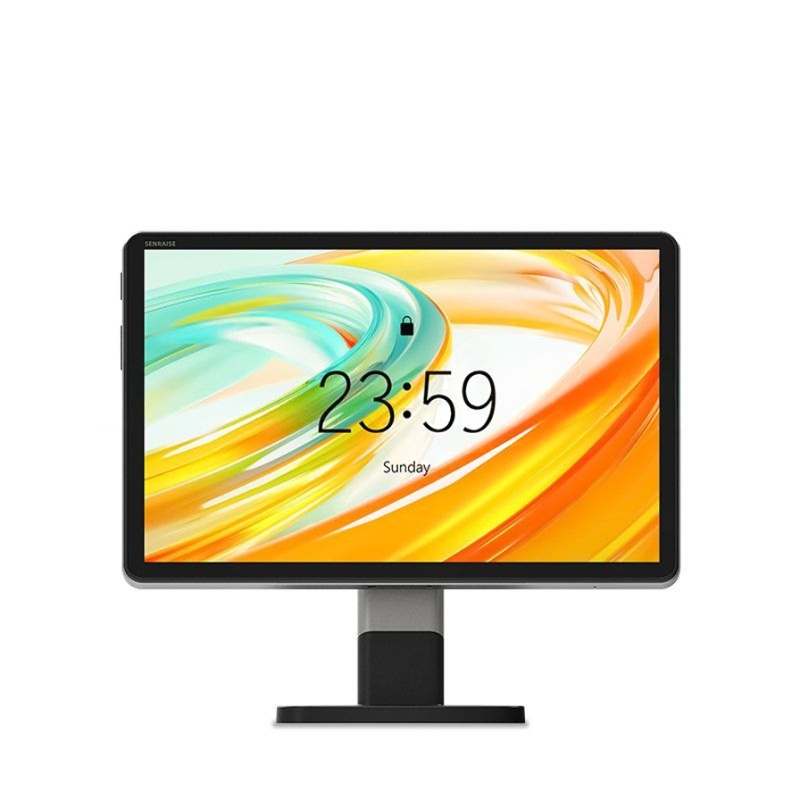
The X1 SENRAISE Android Touch POS Machine is a modern, all-in-one point-of-sale terminal powered by Android 14 (64-bit). Designed for retail stores, restaurants, salons, and service counters, it combines a large 10.95″ multi-touch display, robust octa-core processing, and flexible connectivity in a sleek, space-saving form factor—ideal for businesses seeking a future-proof, app-friendly POS solution without Windows licensing costs.
✅ Key Features & Strengths
🤖 Next-Gen Android Platform
🖼️ Premium Display & Interaction
- 10.95″ Fully Multi-Touch Screen: Large, responsive interface for quick order entry, menu navigation, and staff training
- High-Resolution Visuals: Crisp text and graphics improve readability in bright retail environments
- Intuitive Android UI: Familiar smartphone-like experience reduces onboarding time for new staff
🔋 All-Day Power & Mobility
- 8000mAh Non-Removable Battery: Supports extended shifts; ideal for pop-up stores, tableside ordering, or backup during power outages
- Portable Design: While desktop-styled, the integrated battery adds flexibility for temporary repositioning or mobile checkout scenarios
📸 Dual Camera System
🔌 Expandable Connectivity
- USB Type-C: Modern charging + data transfer; compatible with peripherals like cash drawers or external scanners
- 9× Pogo PIN Connector (Rear): Proprietary interface for seamless attachment of receipt printers, customer displays, or payment modules—enabling a truly modular POS setup
- Wi-Fi + Bluetooth: Cloud sync, remote management, and wireless peripheral pairing
⚠️ Considerations
🎯 Who Should Buy This?
✅ Ideal For:
- Cafes, restaurants, and QSRs needing tableside or counter POS
- Retail boutiques, pharmacies, and salons with moderate transaction volume
- Businesses already using Android-based POS software (e.g., Loyverse, Kyte, custom apps)
- Startups seeking a cost-effective alternative to Windows POS systems
- Pop-up stores or event vendors requiring quick setup + battery backup
❌ May Not Suit:
- High-volume supermarkets needing integrated receipt printing & cash management
- Enterprises requiring Windows-specific legacy POS software
- Businesses needing ruggedized hardware for industrial/outdoor use
- Operations requiring EMV-certified integrated payment processing
💡 Pro Tips for Buyers
- Confirm Software Compatibility: Test your preferred POS app on Android 14 before deployment—some older apps may need updates.
- Bundle Smartly: Ask Synnex about POS printer + stand bundles to reduce total setup cost and ensure Pogo PIN compatibility.
- Enable Developer Options: For advanced users, USB debugging allows easier app deployment and remote troubleshooting.
- Use Cloud Backup: With 64GB storage, enable auto-sync to Google Drive or your POS cloud to prevent data loss.
- Register Warranty Immediately: Activate your 1-year coverage via Synnex (📧 sale@synnex.lk | 📞 +94 11 255 9466) for priority technical support.
🆚 Quick Comparison: X1 SENRAISE vs. Alternatives
💡 Choose the X1 SENRAISE if you prioritize Android app flexibility, modern hardware, and mid-range pricing without Windows overhead.
🏁 Final Verdict
The X1 SENRAISE Android Touch POS Machine delivers a compelling blend of modern hardware, future-proof software, and modular expandability at a competitive price point. Its large touchscreen, powerful processor, and Android 14 foundation make it an excellent choice for businesses embracing cloud-based, app-driven POS workflows.
Bottom Line: At Rs. 135,000, this device offers exceptional value for SMBs ready to leverage the Android ecosystem. While it requires add-ons for a complete checkout station, its performance, display quality, and connectivity options make it a smart, scalable investment for forward-thinking retailers.
🔹 Recommended: ✅ Yes, for Android-compatible SMB POS needs
🔹 Value for Money: ✅ Strong—premium specs at mid-tier pricing
🔹 Ease of Use: ✅ Excellent—familiar Android interface, minimal training
🔹 Expandability: ⚠️ Good, but verify Pogo PIN accessory availability
💬 Need help configuring your POS setup?
Contact Synnex Lanka for expert guidance:
📧 sale@synnex.lk | 📞 +94 11 255 9466 | 📱 +94 74 390 9416
Ask about compatible receipt printers, POS software recommendations, and installation support.
Disclaimer: This review is based on manufacturer specifications and product listing details. Actual performance may vary based on app optimization, network stability, and peripheral compatibility. Always test your complete workflow before full deployment.